The Business plan is the one for a single sales letter. It gives you a polished embed, a timed button, heatmaps that show where people drop off, and an A/B test you judge yourself. Buy it when your traffic fits the bandwidth that plan includes. Skip it when ad traffic will blow past that bandwidth, when the opening has to play with sound, when the button has to stay on screen, or when you expected HubSpot sync on the hosting plan.
It is at its best for a single sales letter on one landing page, as long as the included bandwidth covers the traffic. That is the lens the rest of this review uses: not whether it is the biggest tool on the market, but whether it is the right one for that operator.
If the sales video is the page the ads buy, the VSL video player guide separates play billing from bandwidth billing.
You need the video on the offer page tomorrow, with a button at the minute you choose. A YouTube link puts another company's player, and that company's next video, under your offer.
Wistia is the host a lot of teams already know. The homepage calls the product your team's video HQ. That pitch covers hosting, webinars and automation. For a single sales letter, what you need is narrower than that pitch. Choose Business if you want the button, the heatmaps and a test you score yourself, and if your traffic still fits the bandwidth on that plan. Walk away if the opening has to be heard, if the button has to stay on screen, or if you thought HubSpot sync came with hosting.
See which Wistia plan a letter actually needs.
Wistia for a VSL
Business is the first paid plan that treats the video as part of the page. It adds calls to action and forms, heatmaps, and an A/B test on the embed. The analytics page tracks whether people finish those calls to action, follow annotation links, and submit email capture forms.
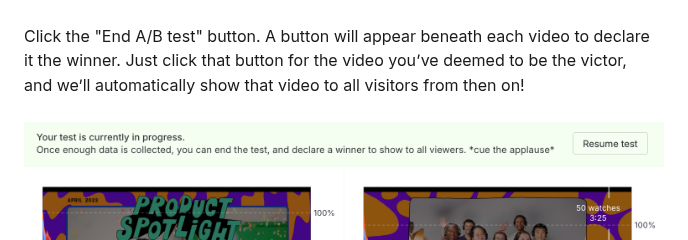
The test serves two embeds in one spot. The player can set a cookie so a returning visitor keeps seeing the same version. Wistia's A/B article says the product will not pick the winner for you. You declare it. Wistia does not pick that winner based on revenue.
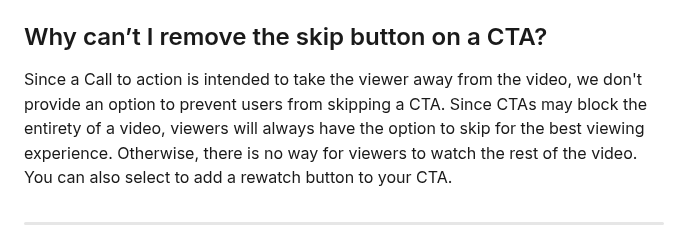
A call to action can be text, an image or HTML, and you can time it. The help article says viewers can skip the overlay, and that there is no switch to block the skip. The button can appear on time. The viewer can close it.
Credits are a separate meter, and they are easy to mistake for a playback charge. Wistia says credits pay for AI and dubbing. Publishing, hosting, playback and analytics views do not spend them. Free includes a lifetime pool of 3,000 or more credits. Business includes 5,000 a month. Simply playing the video does not touch either balance.
What breaks on paid traffic
Playback troubleshooting states the browser limit in one line: muted autoplay is the only approach that plays reliably across modern browsers. The file can start on its own. It starts silent. A demo beside a long B2B page can live with silence until someone clicks. A hook you bought the click to deliver is a weaker fit, because the viewer hears it only after they unmute, and the playhead has already moved.
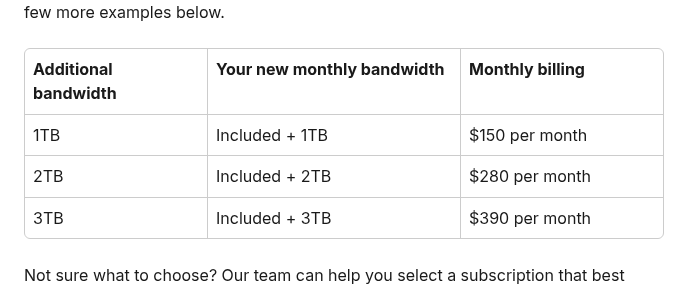
Bandwidth is the other limit. The bandwidth article names a landing page getting paid-ad traffic as a typical spike. Paid plans bill per gigabyte past the included bandwidth. You can buy more bandwidth for a monthly fee. You cannot add bandwidth on the free plan. After a grace period, embeds stop when the monthly cap is hit.
The Vidalytics vs Wistia page compares the two ways of counting usage. Vidalytics counts plays and, on its higher tiers, revenue on the video. Wistia counts storage and bandwidth, and the action inside the player. Read the Vidalytics review if the letter is the whole job and you want billing by plays.
When the bill jumps to Signals
HubSpot, Marketo, Pardot, ActiveCampaign, Eloqua and Klaviyo require Business plus Signals. That plan can log engagement on the contact record, score leads, segment, nurture, alert sales, and attribute pipeline and revenue to the video. A sales letter that only needs a button and heatmaps does not use that stack. A team that already works in one of those platforms does. The annual rate is in the table further down.
Webinars are a separate product, with their own pricing page. Hosting the video and streaming a live session are billed separately.
How I would decide
I would settle the opening before I looked at a price. If the first seconds have to be heard, muted autoplay is the wrong mechanic for this file. The playback article is plain about what browsers will start. Read the Vidalytics review next if that is the blocker.
I would then assume viewers will dismiss the button. Time it anyway. If the offer only works when the overlay stays up, this help article is the reason to pick a different player. The button can still appear on a timer. People can still dismiss it.
I would match Monday's report to the account. Business tracks button clicks, link clicks and form submissions, and it maps where people drop off. A sale the cart sends back to the ad platform is a different report. The head-to-head comparison puts those two reports side by side.
I would see whether the ad traffic fits the included bandwidth, or budget for more bandwidth, before I called Business affordable. The course threads are a warning about a growing library. One file on one page is what this plan is built for. A growing lesson catalog is what those course threads were describing.
I would write down the name of the marketing platform. If watch data needs to sync to the contact record, I would look at what Signals costs. If I cannot name the platform, I would skip Signals.
My take
I would buy Business for a single sales letter, then use the heatmaps and call the A/B test myself. I would buy Signals only if the team already uses one of the supported platforms. I would move a course library once the video count is what drives the bill.
The page around the video is a separate choice. The ClickFunnels review covers a hosted funnel when the steps after the video are the problem. The click that got the visitor there still needs a tracker. The RedTrack review is that layer. If you are choosing the tracker, the checkout and the player together, the stack picker covers the tracker, the checkout and the player in one guide.