Skip to content
Menu

Review

Vidalytics review: is it worth it for your VSL?

By Marcus Flynn, tracking and attribution editor. Updated 20 October 2026.

Quick answer

Vidalytics is our top pick for most people. Vidalytics is worth it if you run a video sales letter with paid traffic and you are ready to pay for Pro, because that plan tracks revenue and ROI on the video. You will regret buying it if you only need somewhere to host brand videos, or if you want that report and do not plan to set conversion goals.

  • Vidalytics. Best for a sales video on paid traffic when you are ready to pay for conversion analytics in the player. Has a free tier.

Where Vidalytics fits

Vidalytics is worth it if you run a video sales letter with paid traffic and you are ready to pay for Pro, because that plan tracks revenue and ROI on the video. You will regret buying it if you only need somewhere to host brand videos, or if you want that report and do not plan to set conversion goals.

It is at its best for a sales video on paid traffic when you are ready to pay for conversion analytics in the player. That is the lens the rest of this review uses: not whether it is the biggest tool on the market, but whether it is the right one for that operator.

The head-to-head on heatmaps, branching video and the cart path is TrackPlay vs Vidalytics.

If the sales video is the page the ads buy, the VSL video player guide separates play billing from bandwidth billing.

Is Vidalytics legit?

Vidalytics is a real company. It has sold a player for video sales letters since 2017. The pricing page lists a free plan and the paid plans, and every paid plan has a trial link. Marketers use it when a sales video sits on a funnel page and they want numbers on that video. A brand channel is a different job.

The purchase goes wrong in three ways. A cold campaign can burn through a small monthly play cap. Starter hosts the video. Revenue and ROI tracking starts on a higher tier. The Golden Tree conversion rates are Vidalytics' own published test. No one outside Vidalytics has repeated that test.

If you came for the prices, see which Vidalytics plan includes revenue and ROI.

Is Vidalytics worth it for the traffic you buy?

Count plays before you count features. The free allowance exists so you can try the embed. A campaign that is already buying traffic will outgrow that allowance. Starter raises how many plays you get and still leaves out revenue, heatmaps, segmentation and Experiments. Pro is the first tier that tracks revenue and ROI on the video, and the first tier that includes those tests. Premium adds interactive video, AI closed captions, more than one user, an API and priority support. Enterprise pricing is a custom quote from Vidalytics.

A quiet test page can stay free while you judge the embed. Put a sales video that you are paying to promote on the plan with the report you will use. Keep room for extra plays after the month's cap runs out. The video keeps playing either way. Vidalytics says the video stays online if you go over the play limit, and that someone from Vidalytics will contact you about an upgrade.

Smart Autoplay starts the video again when the viewer unmutes

Browsers often refuse to start a video with sound. Smart Autoplay checks for that block on each play. When the browser blocks autoplay with sound, playback starts muted. When the viewer unmutes, playback starts again from the first frame, so the pitch is heard from the beginning.

The pricing page describes this fallback beside the plan matrix. The homepage says you can drop this player onto the sales video you already have. The part you can check is this: the opening plays again once the viewer allows sound.

What Pro adds

Conversion tracking on Pro attaches revenue and ROI to the video. The pricing matrix lists that on Pro and above, with Vid Conditions, heatmaps, segmentation and advanced integrations. Segmentation is how the player's own numbers separate buyers from people who watched and did not buy.

The Experiments feature runs an A/B test inside the player, on one placement. You pick one goal: CTA clicks, conversions, watch time or revenue. A Winner Recommender then names a winner for that test. Free and Starter leave the test out. The test lives in the player. Which ad sent the click is still a tracker's job. The RedTrack review covers that, unless the only change you are judging is inside the video.

If you are split-testing the headline on the page that holds the video, read the Unbounce review. If the video lives in a hosted funnel and the order form is the next step, read the ClickFunnels review. The guide that matches a tracker, a checkout and a player asks which combination fits the offer you run.

The Golden Tree rates are Vidalytics' own test

On its Golden Tree case study, Vidalytics reports a 0.24% conversion rate against 0.19% for Wistia. The same page puts YouTube at 0.17% against Wistia at 0.21%, across 595,000 sessions in total. Those figures come from the vendor. Nothing in the sources behind this review reprints the raw test.

Wistia comes up when the job is a team video library, with recording and webinars, and the video is not one sales letter on cold traffic. Vidalytics vs Wistia compares those two jobs. This site has no separate Wistia review.

Vidalytics pros and cons depend on the tier

The short list is in the next section. The features that show whether the video produced sales start on Pro. Cold traffic goes through the monthly plays faster, and the extra plays add to the bill. If you want a different host, or a player that posts the cart's verified sale back to the ad account, the Vidalytics alternatives page separates those jobs.

My take

I would start on Pro if you are sending paid traffic to a sales letter and you need revenue tied to a moment in the video. I would skip Vidalytics for a brand library, a webinar, or a team that only needs the video hosted. Set the conversion goals during the trial. If you leave them unset, Pro is a video host with an empty revenue column.
Pros and cons

What works

  • Smart Autoplay starts the video muted when a browser blocks sound, then restarts from the first frame once the viewer unmutes, so the opening is heard.
  • On Pro, the player tracks revenue and ROI for the video. The pricing matrix includes it on Pro and on every tier above Pro.
  • The Experiments feature runs a built-in A/B test on one placement. You point it at one goal: CTA clicks, conversions, watch time or revenue. A Winner Recommender names the winner.
  • The Pro tier also adds heatmaps, buyer versus non-buyer numbers, and Vid Conditions.
  • A free plan is on the pricing page, so you can embed the player before you pick a paid tier.
  • Going over the monthly play allowance leaves the video online. Vidalytics says a team member will contact you about an upgrade.

What to watch

  • The revenue report, heatmaps, segmentation and Experiments start on Pro. The free plan and the Starter plan host the video, and those analytics tools come later.
  • SpotSaaS says the opening session is overwhelming. A Software Advice reviewer says Vidalytics moved their videos over from Wistia and that setup was easy.
  • Cold traffic uses up the monthly plays faster than a warm list, and extra plays on the free tier cost more than extra plays on a paid annual plan.
  • The conversion rates people repeat come from Vidalytics' own Golden Tree write-up. Those figures are the ones Vidalytics published.
  • Milestones inside the player do not name the ad campaign that produced the sale. That still requires a tracker.
  • A muted start on page load is billed as a view, so cold traffic that never turns the sound on still draws down the allowance.
  • Recording the sale uses a script on the receipt page, matched by cookie and IP, or the Shopify connection.
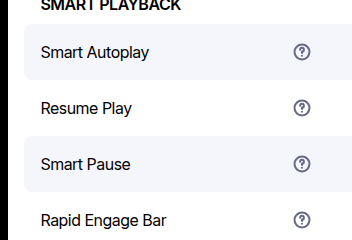
The Smart Playback list on the pricing page, with Smart Autoplay, Resume Play, Smart Pause and Rapid Engage Bar, each next to a help icon.
Smart Autoplay. The Smart Playback list on the pricing page, with Smart Autoplay, Resume Play, Smart Pause and Rapid Engage Bar, each next to a help icon. Screenshot: vidalytics.com,
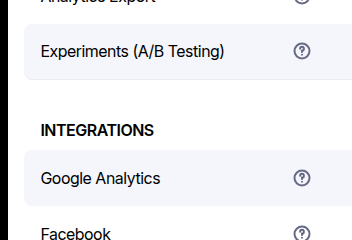
The pricing feature list, with Experiments labeled as A/B testing, above Google Analytics and Facebook under Integrations.
Experiments. The pricing feature list, with Experiments labeled as A/B testing, above Google Analytics and Facebook under Integrations. Screenshot: vidalytics.com,

What users actually say about Vidalytics

Research: unverified

Cold traffic expects muted autoplay

Marketers on Reddit tie muted landing-page autoplay to browser rules that block sound until interaction, and worry that viewers who stay muted miss opening lines unless the player restarts on unmute.

“Most web browsers in most situations no longer allow videos with sound to autoplay on websites without the user interacting with the page and haven't for some time. So if you want the video to autoplay it has to be muted.”

u/GyantSpyder Reddit: Why landing page videos start muted

“what are your thoughts on that same landing page not being able to fast forward nor backwards? My fear is that if you can't fast backwards but it's muted, people miss some of the video.”

u/ProtectionEither3447 Reddit: Muted autoplay and missing rewind

The evidence, quoted

“Most web browsers in most situations no longer allow videos with sound to autoplay on websites without the user interacting with the page and haven't for some time. So if you want the video to autoplay it has to be muted.”

u/GyantSpyder Reddit: Why landing page videos start muted

“what are your thoughts on that same landing page not being able to fast forward nor backwards? My fear is that if you can't fast backwards but it's muted, people miss some of the video.”

u/ProtectionEither3447 Reddit: Muted autoplay and missing rewind

On G2's comparison with Wistia, the praise is for the analytics: how viewers engage, and where in the video they convert. A Software Advice reviewer who came across from Wistia says onboarding was easy, that the videos were moved for them, and that customizing the player was straightforward.

The hard part is the first session when nobody walks you through it. SpotSaaS collects comments that call the first session overwhelming, and its summary lists setup as a drawback. A 2024 Reddit post says the player can track video engagement by UTM parameter, so two ad angles on one embed can be separated. The post never says what that engagement number includes.

Vidalytics pricing: plays, trials and the Pro line

The pricing page lists five plans. Four publish a monthly rate. Enterprise pricing is a custom quote.

PlanYearlyMonthlyPlays / moExtra playRevenue report
Free$0$01,000$0.25No
Starter$19$242,000$0.02No
Pro$63$795,000$0.02Yes
Premium$119$14915,000$0.02Yes
EnterpriseQuoteQuoteQuoteQuoteQuote

Yearly and monthly figures are the per-month rate in US dollars. On Free, the extra-play price in the table is the Free rate. On Starter, Pro and Premium it is the annual rate. Annual billing hands you the year's plays up front: 24,000 on Starter, 60,000 on Pro and 180,000 on Premium.

Vidalytics pricing: plans and play limits

Changelog

  • 20 October 2026: First published. Plan rates, play allowances and the overage rule come from Vidalytics' pricing page. The Golden Tree rates come from Vidalytics' case study. User comments come from G2, Software Advice, SpotSaaS and a 2024 Reddit post.
  • 20 October 2026: Linked the Wistia review from the comparison answer and from the alternatives page.
  • 22 October 2026: Added the head-to-head with TrackPlay, for heatmaps and branching video against a cart postback.

Frequently asked questions

How much does Vidalytics cost?
From $19 per month. Pricing page re-read 2026-10-22 still meters plays. Free Forever: 1,000 plays and 3 videos. Starter $19/mo billed annually ($24 monthly): 2,000 plays a month or 24,000 a year. Pro $63 annual ($79 monthly): 5,000 a month or 60,000 a year. Premium $119 annual ($149 monthly): 15,000 a month or 180,000 a year. Extra plays on those paid rows: $0.02. Going over the monthly play limit does not shut the player off. The plans help article on the same day still describes bandwidth and disagrees with itself: the Starter section says 100 GB and $0.33 per extra GB, the summary table says $0.25 per extra GB for Free and Starter. Use the pricing page for the bill. Muted Smart Autoplay counts as a play (help: how plays are calculated).
Does Vidalytics offer a free trial?
Paid tiers show a 14-day trial on the pricing cards. A free plan is listed beside them.
Does a quiet test page need a paid Vidalytics plan?
The free plan is enough to embed the player and watch a small allowance. Buy Pro when the page is on paid traffic and you need revenue recorded on the video.
What does Pro add that Starter leaves out?
Revenue and ROI on the video, heatmaps, segmentation, Vid Conditions and Experiments. Starter raises how many plays you get and leaves that set off.
How do I choose between Vidalytics and Wistia?
Open the head-to-head. Vidalytics meters plays and is built for a sales letter. Wistia is the broader host for a team that also records and runs webinars. The Wistia review covers transfer, muted autoplay and the Signals tier.
Will the video stop if plays run past the allowance?
Vidalytics says the content stays up. Someone on their team contacts you about an upgrade, and the player is not cut off.
Do I still need an ad tracker with Vidalytics?
Yes, when you need the campaign that produced the sale. The player can mark watch milestones and, on Pro, revenue on the video. The ad click itself is the tracker's job.

Vidalytics's own pages

Other sources

Other sources

2 discussions and reviews read for this page. Quotes are excerpts; open a link to read the original in context.

  1. [r1] Why landing page videos start muted Reddit,
  2. [r2] Muted autoplay and missing rewind Reddit,

How we reviewed this

We do not run paid campaigns through Vidalytics. We read its documentation and pricing, check every figure against the vendor, and weigh what operators report after spending real money on traffic through it. The full rubric is on the methodology page.

Related reading

Marcus Flynn

Written by

Marcus Flynn

Tracking and attribution editor

Marcus Flynn runs OfferROAS's tracking and attribution desk. He covers direct-response paid media for this site, from the tracker to the merchant account. He reads operator threads, vendor changelogs and pricing pages, then writes what those sources support. He sets the methodology and puts his name on the commercial pages.

marcus@offerroas.com

Last checked 2026-10-20

Comments

No comments yet. Questions and your own experience are welcome.

Leave a comment

Thank you. Your comment will appear once it has been reviewed.